Published by PitchChanger · Updated · How these guides are made
Hear the difference
Both original examples contain 12 pulses spaced 0.5 seconds apart. Only the repeating accent group changes. Count four groups of three against three groups of four.
Pause your workspace preview before comparing these clips.
These six-second WAVs were synthesized separately as educational examples, not exported by the metronome. The live tool has no click-track download feature. Each clip’s first pulse starts at 0.25 seconds.
How to use this workflow
Hold the BPM constant
Open Metronome, enter 120 BPM and press Enter or leave the field to apply it. Choose Click and a comfortable volume.
Count a three-beat group
Select 3 under Beats per bar and press Start. Count ONE–two–three, repeating ONE on each stronger click. Keep the tab visible.
Change grouping, then compare
Stop, choose 4 and start again without changing BPM. Count ONE–two–three–four. The clicks keep the same spacing; there is one more click before the accent repeats.
BPM and beats per bar measure different things
BPM means beats per minute. In this tool, one scheduled click is one counted beat. Its spacing in seconds is 60 divided by BPM. Choosing another accent cycle changes which click is emphasized, not that interval.
At 120 BPM, a two-click cycle lasts 1 second, a three-click cycle 1.5 seconds, a four-click cycle 2 seconds and a six-click cycle 3 seconds. These are calculations from settings, not measurements of speaker latency.
Swipe or scroll sideways to read all columns.
| Beats in cycle | Click spacing at 120 BPM | Time until next accent |
|---|---|---|
| 2 | 0.5 s | 1.0 s |
| 3 | 0.5 s | 1.5 s |
| 4 | 0.5 s | 2.0 s |
| 6 | 0.5 s | 3.0 s |
Change the accent cycle while holding tempo fixed
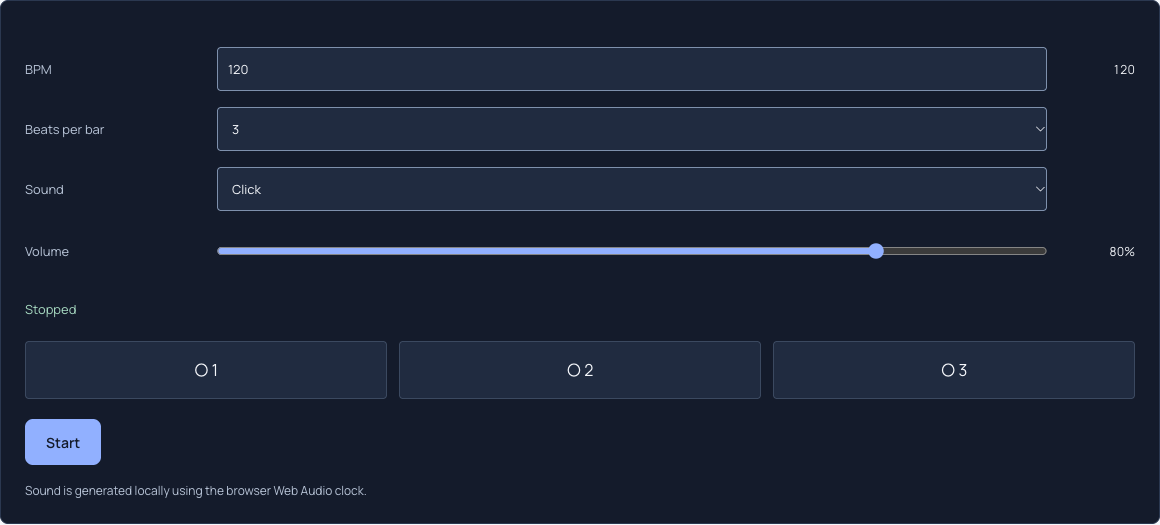
The screenshot shows the actual local tool at 120 BPM with Beats per bar set to 3. The three indicators correspond to the chosen group. Switching to 4 adds a fourth position; it does not require a different BPM.
Start each comparison from a stopped state for an easy first-accent cue. Count evenly between strong clicks without rushing the final click of a group. The task is an even pulse, not reaching ONE as quickly as possible.
Check the accent times in the authored examples
Both files place their first pulse at 0.25 seconds and each later pulse 0.5 seconds after the last. Three-beat accents occur at 0.25, 1.75, 3.25 and 4.75 seconds. Four-beat accents occur at 0.25, 2.25 and 4.25 seconds.
A different accent rhythm can change the pattern’s feel while neighboring clicks stay equally spaced. These times come from the synthesis schedule, so the comparison can be reproduced without treating a subjective impression as a tempo measurement.
Swipe or scroll sideways to read all columns.
| Example | Count pattern | Accent spacing |
|---|---|---|
| Three beats | ONE two three | ONE two three | 1.5 s |
| Four beats | ONE two three four | ONE two three four | 2.0 s |
A beat group is not a full time signature
A written time signature also specifies a note value. This selector has no denominator or independent subdivision control. Three clicks can support counting three equal pulses, but the tool does not decide whether each pulse represents a quarter note, eighth note or another value.
In 6/8, musicians often feel two larger beats, each divided into three eighth notes. Selecting 6 here simply accents every sixth equal click; it does not add a secondary accent on click four. Selecting 2 for the larger beats leaves you to count their subdivisions. Soundbrenner’s separate rhythm controls are different features, not controls available here.
Choose the pulse for your practice task
If the task is steady quarter notes at 90 BPM, set 90 and choose a group that helps you keep your place. If you deliberately count twice as many clicks per musical beat, calculate that click rate separately and note which value each click represents. Keep the interpretation consistent between repetitions.
The metronome supports 40–240 BPM and groups of 2, 3, 4 or 6. It pauses when hidden and neither analyzes nor follows another audio file. Use BPM Finder or Tap BPM for a reference recording, then check alignment yourself.
Common questions
Does changing from four beats to three make the tempo faster?
No, if BPM stays the same. At 120 BPM every click remains 0.5 seconds from the next. The accent returns after 1.5 seconds with three clicks or 2 seconds with four. A shorter group is different grouping, not a faster click rate.
Is six beats per bar a complete 6/8 setting?
No. It only accents every sixth click. A written 6/8 pattern may group eighth notes into two larger beats, but this tool has no separate denominator or subdivision controls. Choose what each click represents before selecting the group.
Can I export these patterns from the live metronome?
The live tool does not export audio. This guide’s downloads were synthesized separately to illustrate pulse spacing and accents. Use the metronome for live practice and keep the page visible so playback is not intentionally paused.