Published by PitchChanger · Updated · How these guides are made
Hear the difference
The full original test begins with 12 seconds of intentional silence, followed by a known 120 BPM pulse. The excerpt contains only the following 16-second pulse section.
Pause your workspace preview before comparing these clips.
Both WAVs were synthesized at 48,000 Hz, mono, 16-bit PCM. The excerpt is an exact programmatic slice, not a recording or a claimed Audio Trimmer export. The browser results below were observed on these files.
How to use this workflow
Choose the pulse you need
Listen for a steady section with repeated attacks, such as a regular drum, bass or chord pattern. Include several complete repetitions. Keep the original so you can check another section.
Save an excerpt with the trimmer
Open Audio Trimmer and keep the chosen start-to-end range. Save WAV with no fades for the first timing check. BPM Finder has no manual window selector: it analyzes the file you import.
Compare the estimate with the music
Import the excerpt into BPM Finder. Read its analyzed source interval, BPM and half/double-time candidates. Count or tap the pulse before using that value to slow a practice track.
What makes a useful BPM detection passage?
Choose the section whose tempo matters to your next task. A steady chorus can be useful for chorus practice even when an introduction has no regular beat. Prefer an obvious repeating pattern over one isolated hit or a long held note.
Changing the excerpt changes the evidence given to the detector. It does not establish one correct tempo for a whole performance. Mixxx’s beat-detection documentation distinguishes constant-tempo assumptions from variable-tempo analysis; different tools can make different assumptions.
Swipe or scroll sideways to read all columns.
| Source passage | Useful next step |
|---|---|
| Clear repeated pulse | Include several repetitions and compare with counted beats. |
| Silence or free-time opening | Choose a later section if that is the passage you need. |
| Tempo changes partway through | Analyze relevant regions separately; keep their source times. |
| Only a sustained note | Choose clearer timing cues or count manually. |
Know which part of the file is analyzed
The current BPM Finder needs at least 10 seconds. For files up to 60 seconds, it analyzes the whole file. For a longer file, it uses a centered 60-second interval and displays that interval below the result. A 180-second import therefore supplies the 60–120-second region.
To choose another region, make a separate WAV with Audio Trimmer. In the supplied source, start 12000 ms and end 28000 ms keep the 16-second pulse section. After importing the new file, its displayed times refer to the excerpt: add 12 seconds when mapping them back to the original.
Compare the known pulse with the observed result
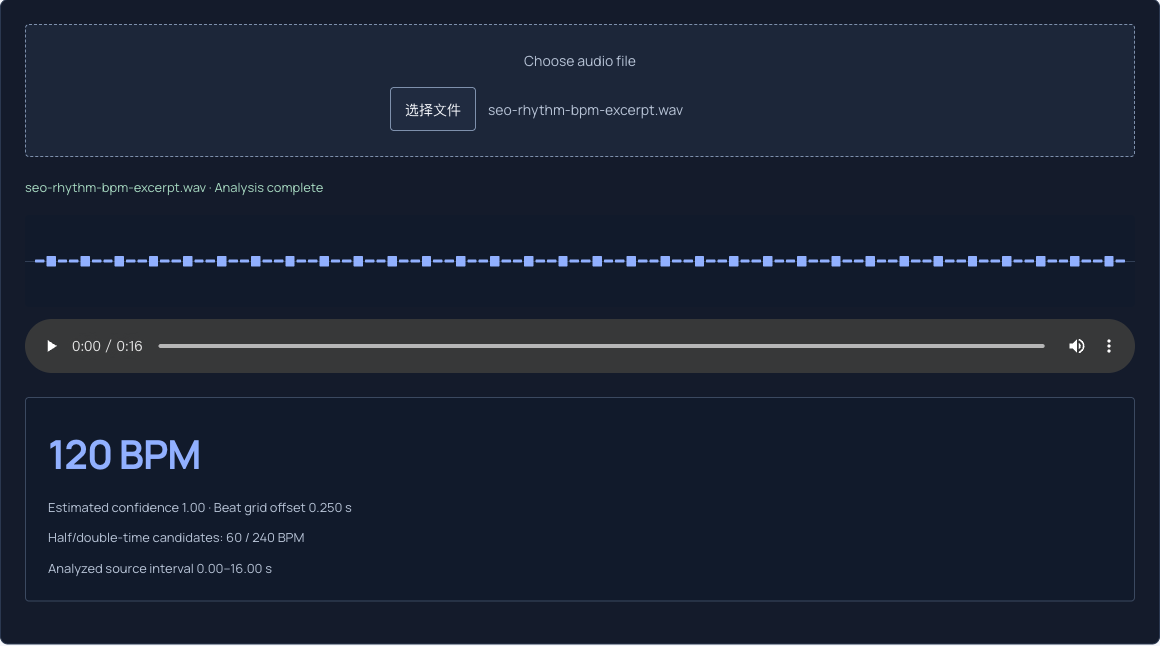
In a local browser check on 17 October 2026, the full 28-second source returned 120 BPM with displayed confidence 0.63. The 16-second excerpt also returned 120 BPM, with confidence 1.00. Both showed 60 and 240 BPM as half/double-time candidates. These are results for one simple synthetic fixture, not an accuracy measurement on music.
Removing the silent lead-in strengthened this detector’s internal confidence for the same pulse; it did not correct a wrong BPM in this example. Confidence is not a percentage probability that the musical interpretation is correct. Beat grid offset describes the estimated grid’s phase, not necessarily the first audible attack.
Swipe or scroll sideways to read all columns.
| Imported file | Analyzed interval | Observed BPM | Displayed confidence |
|---|---|---|---|
| Full source | 0.00–28.00 s | 120 | 0.63 |
| Steady excerpt | 0.00–16.00 s | 120 | 1.00 |
Count intervals, not just attacks
The excerpt has 32 pulse onsets, from 0.25 to 15.75 seconds. There are 31 intervals between those 32 events, spanning 15.5 seconds. The calculation is 31 × 60 ÷ 15.5 = 120 BPM.
Using 32 as the number of intervals would overestimate the tempo. To check an unknown recording, mark a first beat and a later beat, count the spaces between them, and divide by elapsed time. Sonic Visualiser’s reference describes the relationship between beat period and BPM. Counting is a separate check on an automatic estimate.
Use a checked estimate for the next task
If 60, 120 and 240 seem plausible, count the pulse that fits the musical phrasing and note lengths you are practicing. A dense subdivision can be twice the beat you want. Test another passage rather than choosing the largest number or highest confidence without listening.
Once the interpretation is useful, take it to Audio Speed Changer or a separate metronome. BPM Finder does not create a tempo map, synchronize a click with the recording or follow a changing-tempo performance. Keep the excerpt’s source interval beside the result.
Common questions
Can I select an analysis region inside BPM Finder?
No. The current page analyzes an imported file automatically. Save the desired region as a separate WAV with Audio Trimmer, then import it. Keep at least 10 seconds and note the source start time so excerpt timestamps can be mapped back to the original.
Does confidence 1.00 mean the BPM is certainly correct?
No. It is an internal score, not a measured accuracy percentage. This synthetic excerpt produced 1.00, but a recording can support different pulse interpretations. Compare the candidates with counting, tapping and another section.
Will one excerpt describe a performance with tempo changes?
Only the chosen region. A chorus estimate does not describe an earlier free-time introduction or a later tempo change. Check separate regions when the performance changes; this tool does not output a continuous tempo map.