Published by PitchChanger · Updated · How these guides are made
Hear the difference
A real browser conversion of the owned six-second tone sequence from a 44.1 kHz reference WAV to 48 kHz PCM.
Pause your workspace preview before comparing these clips.
Synthetic source; actual converter export. The fixture checks duration and file properties, not video sync or subjective resampling quality.
How to use this workflow
Read the destination requirement
Check the sequence or project audio settings in your video editor and any delivery specification. Record the requested rate and channel layout before exporting.
Set the converter explicitly
Open Audio Converter, select WAV, choose 48000 Hz and the required 16- or 24-bit depth. Import the source and choose Start conversion.
Verify the saved result in context
Download WAV, inspect its reported rate and duration, then place it at the intended start point in the video editor. Check sync near both the beginning and the end.
Audio sample rate is separate from video frame rate
Audio samples per second and video frames per second are different quantities. A 48 kHz audio project does not mean 48,000 video frames per second. Adobe lists 48,000 Hz as a typical professional-video rate, but your actual project requirement takes priority.
At 24 fps and 48 kHz there are 2,000 audio sample frames per video frame. At other frame rates the relationship may not be a whole number. You do not need to change a video’s fps just to match the requested audio sample rate.
Reproduce a six-second 44.1-to-48 kHz handoff
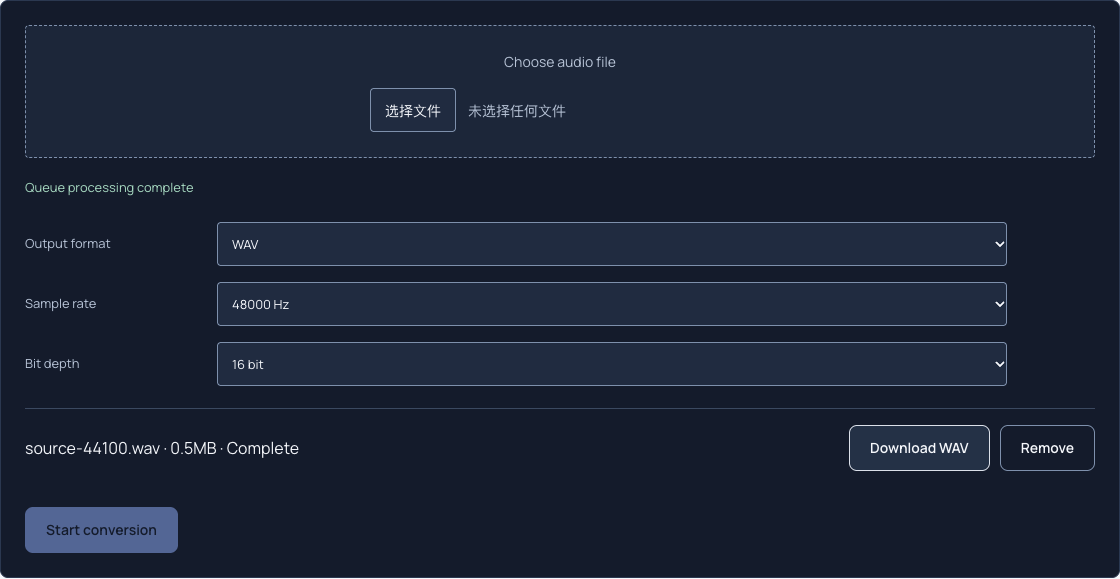
For a calculated six-second mono clip, 44,100 × 6 = 264,600 source frames. A duration-preserving 48 kHz result needs 48,000 × 6 = 288,000 frames. The ratio is 160/147. This is a conversion target, not a claim that all formats have identical frame or packet counts.
We also made a 44.1 kHz reference copy of the authored six-second tone sequence, then used the actual browser converter to export WAV at 48 kHz and 16 bit. Independent FFprobe inspection confirmed mono, 48,000 Hz, 16-bit PCM and 6.000 seconds; the downloaded file is 576,078 bytes including its metadata. This checks this one conversion, not video-editor sync or device-wide compatibility.
Swipe or scroll sideways to read all columns.
| Case | Audio frames | Duration |
|---|---|---|
| 44.1 kHz source | 264,600 | 6.000 s |
| 48 kHz resampled result | 288,000 | 6.000 s |
| Same 264,600 frames interpreted at 48 kHz | 264,600 | 5.5125 s |
Why changing the rate label can break sync
Reinterpreting the original 264,600 frames at 48,000 Hz takes 264,600 ÷ 48,000 = 5.5125 seconds. The clip ends 0.4875 seconds early. The effective playback ratio is about 1.0884, making the sound faster and higher.
Proper resampling creates new sample positions for the same intended duration. Upsampling does not reveal detail missing from the source. Avoid repeatedly converting between rates when one final conversion will meet the handoff requirement.
Verify rate, timing and channels separately
The converter supports 44.1, 48 and 96 kHz, with MP3 and AAC limited to 44.1 or 48 kHz. WAV offers 16- or 24-bit output. A 48 kHz choice alone does not establish stereo layout, loudness compliance or sync accuracy.
Inspect the downloaded file’s stream metadata and play it in the destination editor. If timing still drifts despite correct duration and rate, investigate the recording clocks, original sync or edit alignment instead of repeatedly resampling. Keep the original available for comparison.
Common questions
Should every audio file be converted to 48 kHz?
Use the destination requirement. A project that already accepts the source rate may conform it internally; there is no benefit to changing rates merely for a larger number.
Does 96 kHz fix a low-quality recording?
No. Increasing sample rate does not restore discarded source information, remove noise or repair a damaged recording.