Published by PitchChanger · Updated · How these guides are made
Hear the difference
Hold source and duration constant while comparing three curves. Each file uses the same synthesized 220 Hz tone; keep playback volume fixed.
Pause your workspace preview before comparing these clips.
Measured exports: 48 kHz, mono, 16-bit PCM, six seconds each. Fade-in is 2000 ms, fade-out is zero. The first file is the synthesized source.
How to use this workflow
Keep the source and selection fixed
Open Audio Trimmer and import the downloadable original tone. Set Start time to 0 ms and End time to 6000 ms. Leave Fade-out milliseconds at 0 so the ending does not affect the comparison.
Set the duration once
Enter 2000 in Fade-in milliseconds. The fade should reach full gain after the first two seconds; the selected file should remain six seconds long.
Export each curve separately
Choose Linear, press Preview result and download the WAV. Repeat with Exponential and S-Curve, keeping the same 2000 ms duration and source selection. Prepare a new result after each setting change.
Choose the shape before adjusting duration
Listen at a consistent playback volume. Decide whether the beginning should emerge more slowly or reach a useful level sooner. Then adjust duration on your own material and preview the full transition again.
Fade-in curve vs duration: two different decisions
Duration moves the end of the fade along the timeline. Changing a two-second fade to four seconds spreads the same shape over twice as much time. Changing the shape while leaving duration at two seconds changes the intermediate gain but keeps the endpoint in place.
A fade multiplies the existing audio; it does not move the first note, insert leading silence or change playback speed. The source may already have an attack or a gap, so the same envelope can produce a different result on a different recording.
Swipe or scroll sideways to read all columns.
| If you need… | Change… | Keep fixed first |
|---|---|---|
| The full-level point earlier or later | Fade-in duration | Curve and selection |
| A different rate of emergence inside the same time | Fade-in curve | Duration and source |
| The first audible event to move in time | The source edit or arrangement | A fade cannot move the event |
Compare Linear, Exponential and S-Curve shapes
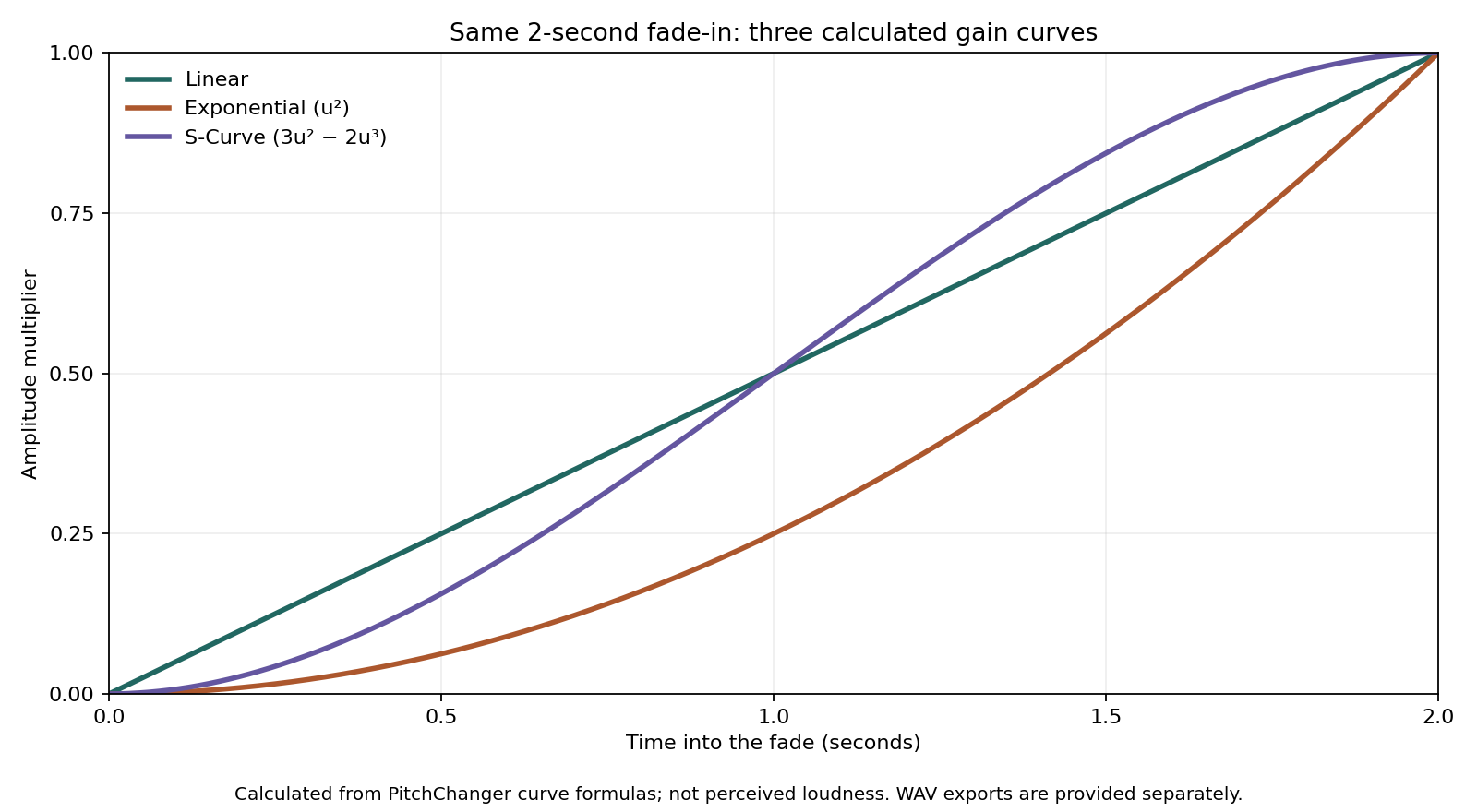
In this tool, Linear uses gain u, Exponential uses u², and S-Curve uses 3u² − 2u³, where u runs from zero to one across the fade. Exponential is the product’s label for a quadratic amplitude curve; another editor may use a different formula under the same label.
These are calculated amplitude multipliers, not percentages of perceived loudness. At the halfway point, Linear and S-Curve both apply 0.5 gain, while Exponential applies 0.25. S-Curve starts below Linear and finishes above it before both reach one.
Swipe or scroll sideways to read all columns.
| Progress through fade | Linear | Exponential | S-Curve |
|---|---|---|---|
| 0% | 0 | 0 | 0 |
| 25% | 0.25000 | 0.06250 | 0.15625 |
| 50% | 0.50000 | 0.25000 | 0.50000 |
| 75% | 0.75000 | 0.56250 | 0.84375 |
| 100% | 1 | 1 | 1 |
What the controlled exports establish
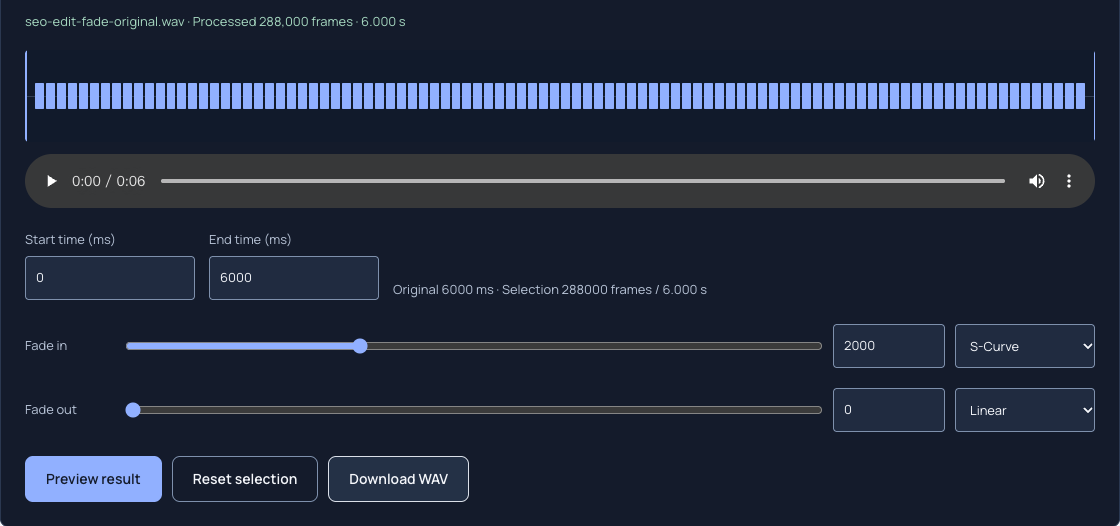
The original is a synthesized 220 Hz tone at 48 kHz. All three files were exported through Audio Trimmer with a 0–6000 ms selection, 2000 ms fade-in and no fade-out. Each exported WAV contains 288,000 frames and lasts 6.000 seconds.
We compared each decoded export with the source multiplied by its documented curve. The largest absolute sample difference was below 0.000016 on a scale where 1 is full scale, consistent with the 16-bit output quantization. This verifies the applied envelopes for these files; it does not rank one shape as universally better.
Choose a fade for the source you actually have
Use the clips to decide what you want to compare, then repeat on the real recording. A sustained pad exposes the rising envelope differently from a short drum attack. A fade that hides the start of a tone can remove a consonant or soften a musical attack you meant to keep.
- For a simpler reference, start with Linear and note where the source becomes useful in the mix.
- If the entrance should stay lower for longer at the same duration, compare Exponential.
- If both the beginning and end of the ramp should change more gradually, compare S-Curve.
- Judge the transition in context and check the downloaded file, not only the waveform’s appearance.
Keep the fade inside the selected interval
The trimmer keeps one contiguous selection and downloads WAV. Millisecond values are rounded to audio frames; at 48 kHz, one frame is approximately 0.0208 ms. The interface limits a fade to the selected length.
Fade-in and fade-out are independent. If they overlap, their gains multiply, so overlapping fades may hold the middle below full gain. Start with the other fade at zero when isolating one shape. There is no automatic silence trimming or zero-crossing snap in this workflow.
Common questions
Does a longer fade-in make the audio file longer?
No. A fade changes amplitude within the selected audio. In this experiment, a two-second fade-in leaves all three exports at six seconds. To change file length, change the selection; to move a sound later, use an arrangement workflow rather than a fade.
Is the Exponential option a constant decibel increase?
No. In this tool the Exponential label uses the amplitude formula u². A constant rise in decibels is a different relationship. Use the plotted gains and the exported comparison files when matching this tool’s behavior instead of relying on the curve name alone.
Why can Linear and S-Curve sound different if both are at 0.5 halfway through?
Their gains differ before and after the midpoint. At one-quarter of the fade, Linear is 0.25 and S-Curve is 0.15625; at three-quarters they are 0.75 and 0.84375. The complete path interacts with the changing source, not just its midpoint.