Published by PitchChanger · Updated · How these guides are made
How to use this workflow
Choose the reference first
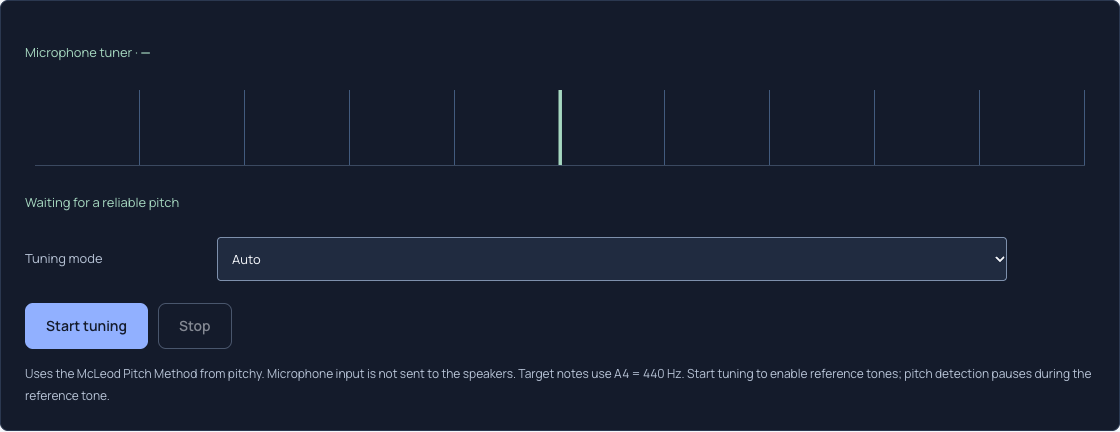
Open Guitar Tuner and set Tuning mode to Standard for E2–A2–D3–G3–B3–E4, or Auto for a general chromatic reading.
Pluck only the intended open string
Start tuning, allow microphone access and mute the other strings. Let the attack settle before judging a stable reading.
Lock a target when necessary
Select the named string button, tune in small movements, then choose Auto string to release the lock. Stop when finished.
Auto and Standard answer different questions
Auto chooses the nearest chromatic semitone from the detected frequency. It can tell you that a stable sound is close to F, even when your intention was to tune a low E string. A centered Auto reading says the detected pitch is near that note; it does not confirm the intended guitar tuning.
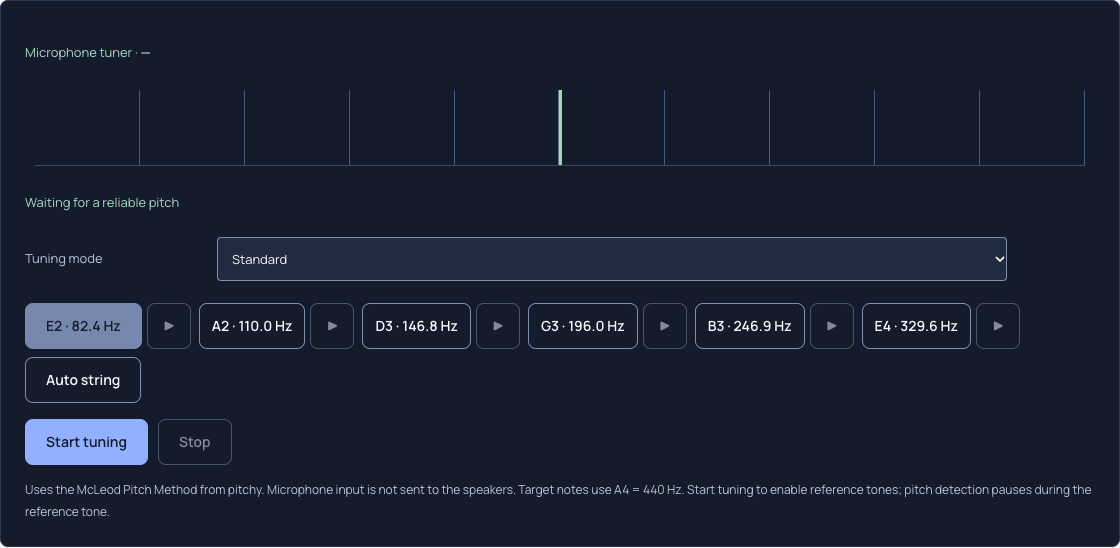
Standard restricts automatic targets to the six standard open-string references. Selecting a string button fixes that target while you work. BOSS’s tuner documentation illustrates the same broad distinction between chromatic and instrument-specific modes, but the controls shown here belong to PitchChanger.
Swipe or scroll sideways to read all columns.
| Goal | Mode or control | Meaning |
|---|---|---|
| Identify a note | Auto | Nearest chromatic note |
| Tune standard open strings | Standard | Nearest preset string target |
| Keep low E as the reference | E2 target button | Fixed 82.4 Hz reference |
Check all six targets, including their octaves
At the fixed A4 = 440 Hz reference, standard tuning from lowest to highest is E2 82.41 Hz, A2 110.00 Hz, D3 146.83 Hz, G3 196.00 Hz, B3 246.94 Hz and E4 329.63 Hz. These are equal-temperament reference calculations, not measurements of your instrument.
The screenshots below were captured from the real interface with no microphone active. Auto has no string buttons; Standard displays the six targets, and the low E button is selected. They document control state, not microphone accuracy.
If a target feels wrong, check the mode before turning the peg
A guitar already in Drop D should not be forced toward Standard low E merely because that mode is selected. Choose the preset that matches your musical task before locking a string. Changing the preset clears the old target lock.
The note name and target are separate from detection reliability. If the reading jumps by an octave, mute neighboring strings and inspect the frequency before making a large adjustment. A fixed target cannot restore a missing fundamental or identify several strings at once.
Use reference tones as a separate listening check
Reference tone buttons become available after Start tuning grants input access. Detection pauses during the reference tone to avoid interpreting that generated sound as your string. Keep playback restrained and compare one string at a time.
This tuner has no custom A4 calibration, custom tuning editor or polyphonic mode. Microphone input is not sent to your speakers. When the intended string is stable against the right target, stop the microphone and return to playing.
Common questions
Does Standard tune the guitar automatically?
No. It supplies references; you still turn the physical tuning pegs.
Can I lock a string in Auto mode?
The preset string buttons appear in a named tuning mode. Choose Standard or another supported preset first.